Clarity AI
Clarity AI is a route-aware assistant for exploring data, running supported analyses, creating datasets and models, and carrying out research workflows in Clarity.
Open it with the Clarity AI control in the command bar. The side panel remains beside the current page and includes that page's context when supported. Start a separate task with New conversation.
Available agents, model choices, workflows, and tools depend on your tenant configuration and enabled features. Clarity AI therefore does not use one fixed model or expose one identical tool set in every session.
Studies and workflows
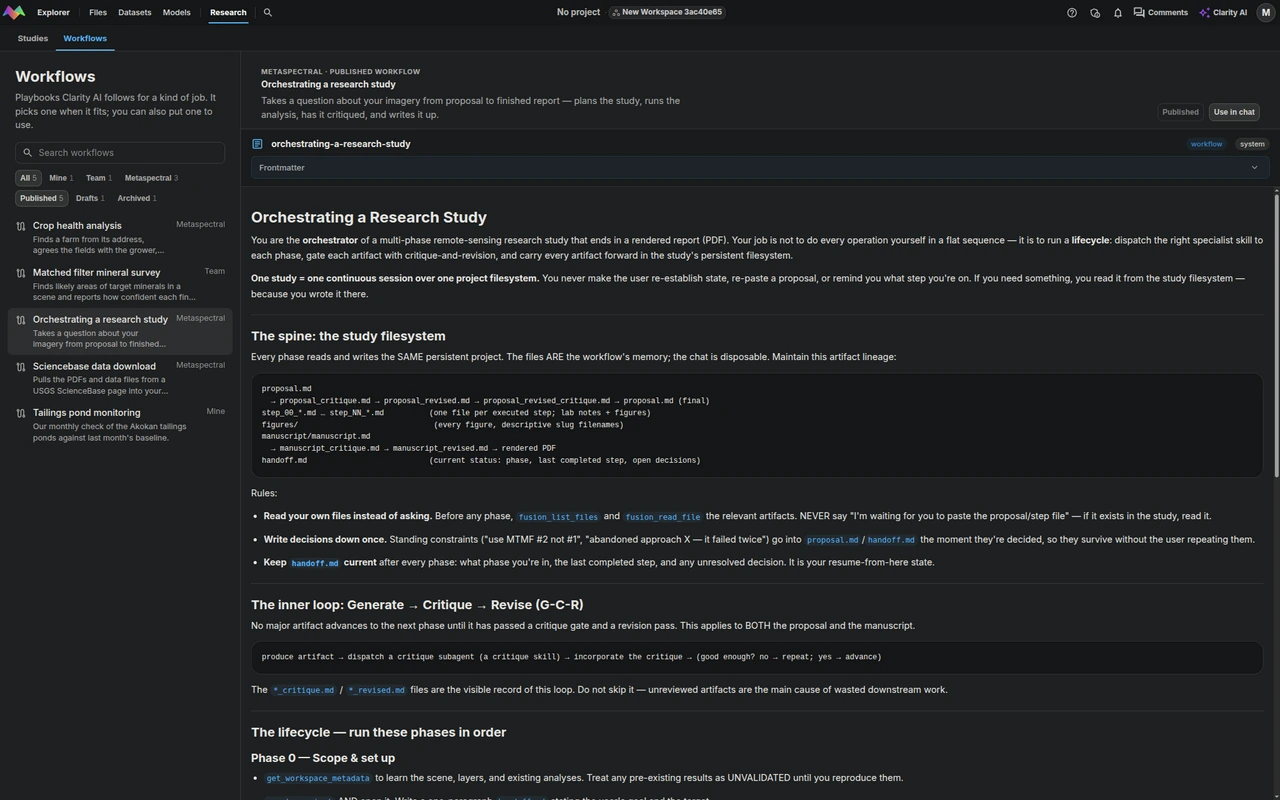
Open Research in the command bar to browse the work behind Clarity AI conversations:
- Studies contains each investigation's brief, notes, code, reports, and other files. Select a study, then a file to read it.
- Workflows contains reusable playbooks. Filter by owner and Published, Drafts, or Archived status, then select a workflow to read it. Choose Use in chat to add an available workflow to the conversation.
The tabs keep their selections while you switch between them. You can bookmark /research for Studies or /research?tab=workflows for Workflows. Existing /studies and /workflows links still open the matching tab.
Tool confirmation
Use the autonomy control in the message composer to choose when Clarity AI asks before a tool call:
Low autonomy: ask before every tool call.Medium autonomy: ask only for high-impact tool calls.High autonomy: run tool calls without asking.
Review the requested action and its target before approving a high-impact operation.
Learn more
- Example prompts: start common analysis, data, model, and research tasks.
- Deep research workflow: understand the phased scientific-research process.
- Capabilities and tools: see representative verified tools and availability rules.